Key Icon on Android Screen: What It Means and How to Remove It
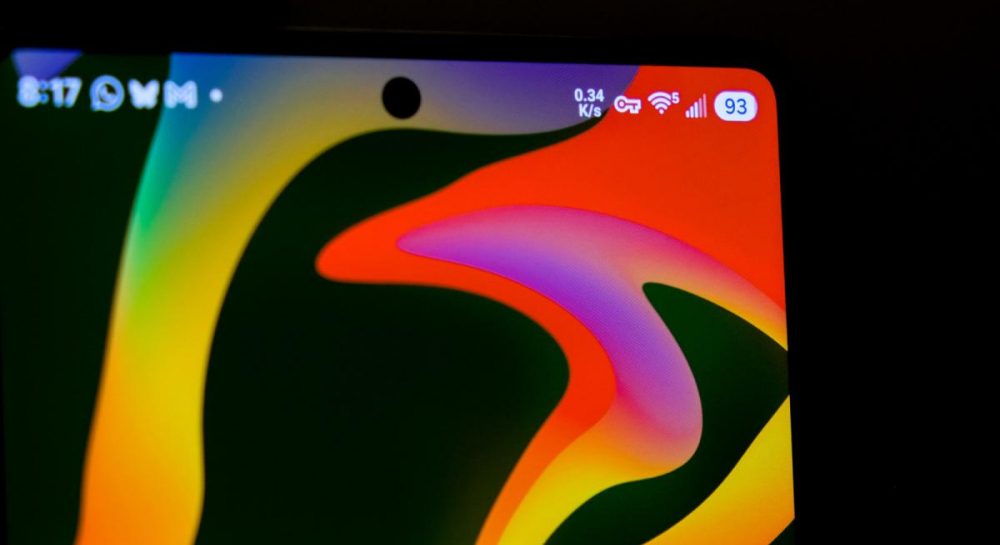
A small key symbol on the top panel of Android smartphones often worries users, but it actually indicates an active and secure internet connection.
 💡Tech
Photo: UNIAN
Key points
- The key icon on Android indicates an active VPN service running.
- The indicator confirms traffic encryption and enhanced data protection.
- Disabling the icon on most devices is restricted for security reasons.
Smartphone users running the Android operating system occasionally notice an unusual symbol in the status bar — a miniature key with two prongs. As experts from specialized publications explain, this indicator does not signal a hacking attempt or a technical malfunction. On the contrary, its presence confirms that your internet connection is securely protected at the moment.
Why the Key Icon Appears
The primary reason for this icon to appear is the active operation of a VPN service on the device. While the key is displayed on the screen, all incoming and outgoing internet traffic is encrypted, the real IP address remains hidden from prying eyes, and personal data is kept safe, especially when connecting to public Wi-Fi networks. If the icon suddenly disappears, it means the VPN connection has dropped and traffic is no longer encrypted.
How to Hide the Indicator
On most mobile devices, developers have intentionally blocked the ability to disable this icon so that users are always aware of their security status. An exception is made for Samsung Galaxy owners, who can download the proprietary Good Lock customization app from the Galaxy Store, open the QuickStar module, and turn off the VPN indicator in the notification panel settings. Otherwise, the simplest way to remove the symbol is to stop the VPN connection itself through the phone settings.
Source UNIAN — unian.ua/techno/gadgets/znachok-klyucha-u-paneli-na-android-za-shch… ↗
Read next
 💼Economy
National Bank of Ukraine raises official exchange rates for November 24
The National Bank of Ukraine has updated official exchange rates, recording an increase in the cost of the dollar and the euro following a previous decline.
 💼Economy
National Bank Weakens Hryvnia: Official Exchange Rates for November 24
The National Bank of Ukraine has set the official exchange rate of the hryvnia against the dollar and euro for November 24.
 🛡️Security
Massive Russian strikes target railway and energy infrastructure across Ukraine
Over the past 24 hours, Russian forces have launched a series of strikes against Ukrainian civilian infrastructure, resulting in six deaths and numerous casualties.
 🛡️Security
Russian forces upgrade 'Molniya' drones for reconnaissance
Presidential advisor Serhiy Beskrestnov reported on the emergence of a new 'Molniya' drone modification featuring a gasoline engine and improved data transmission systems…
 🚨Events
Hospital Patient Sets Fire to Bed in Berlin, Leaving 15 Injured
An evening incident at a medical facility in the German capital led to evacuations and fifteen injuries due to a deliberate bed fire.
 🛡️Security
Russia Builds Military Infrastructure 60km from Finnish Border
Satellite imagery reveals large-scale construction at the Kamenka garrison, aimed at expanding Russian military presence near the Finnish border.